
How Kerja works
Here’s a morning on Kerja, from opening the app to saying hi.
Chapter 1
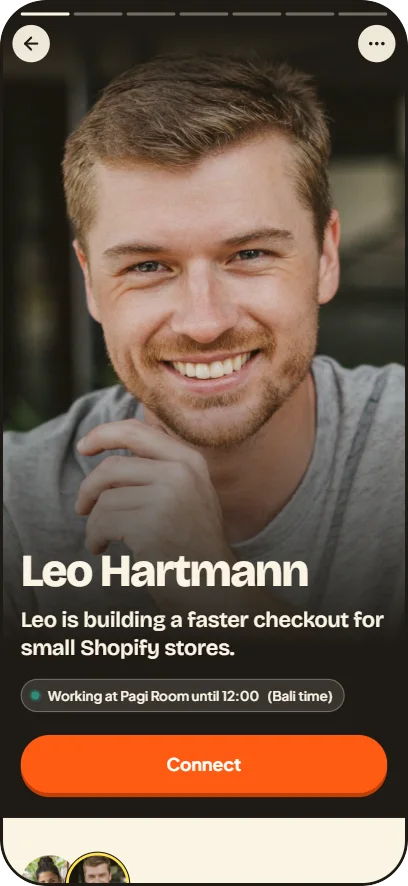
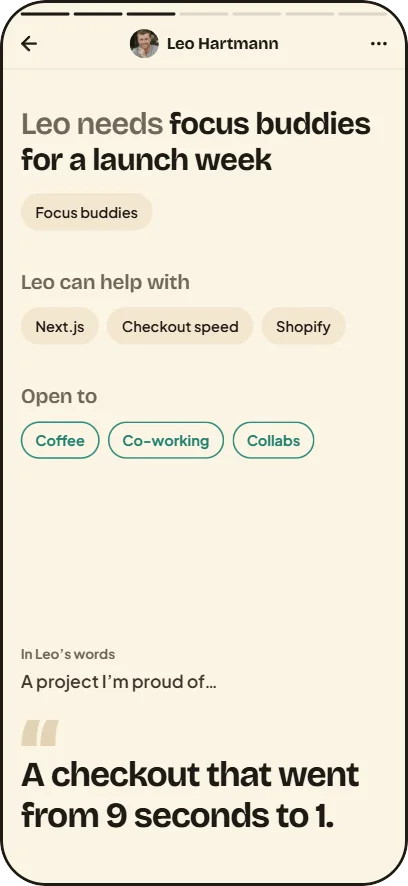
Show what you’re building
Your profile tells people what you do and what you need. It’s enough to start a good conversation.
Also here
- Sign in with Apple, Google or your email.
- One photo, your name and a headline.
- What you do, and what you’re looking for: clients, a co-founder, focus buddies, content…
- What you’re building, and what you need right now.
- Up to 3 things you can help with.
- Your answers to two questions, like “A project I’m proud of…”
- Open to: coffee, co-working, collabs.
- Your portfolio and Instagram.
- How long you’re in Canggu, and your next city (shown only to your connections).
One photo. No age. No follower count.
Chapter 2
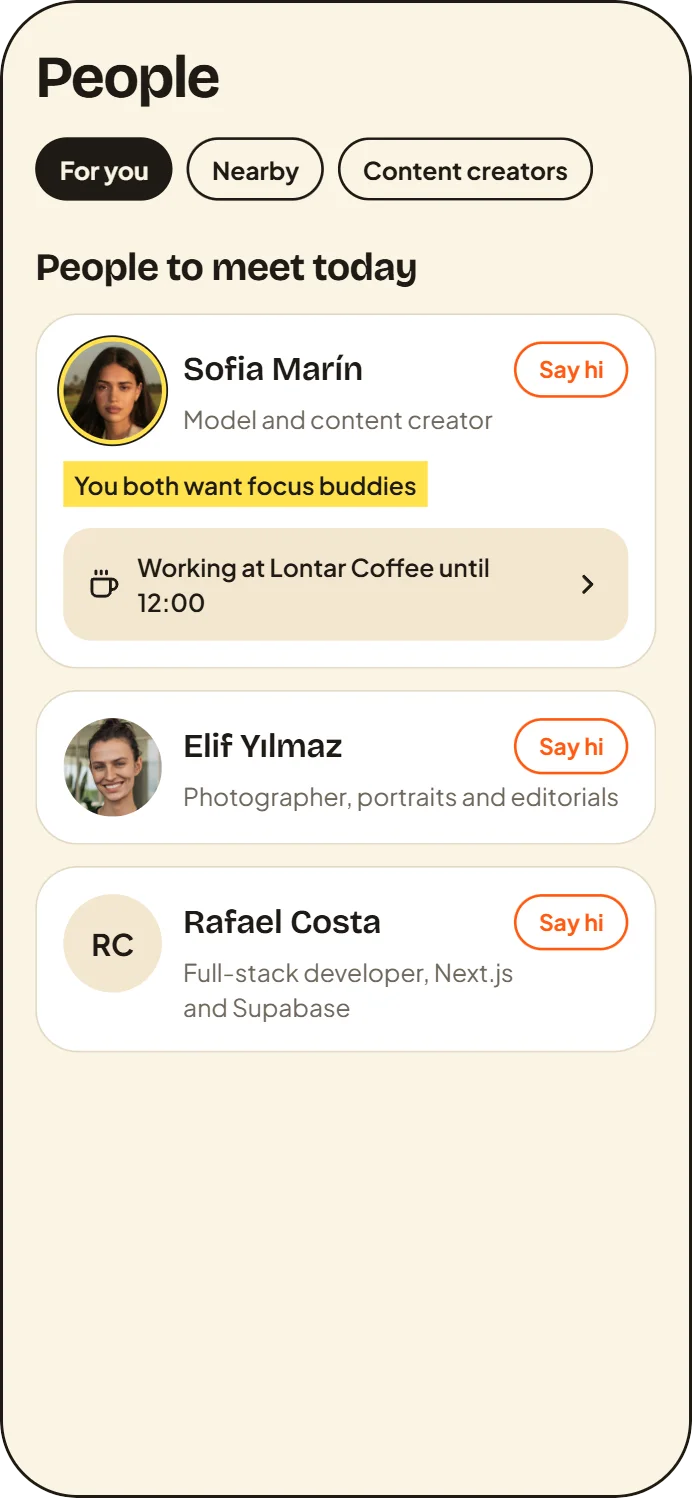
Meet the right people today
Every day, Kerja picks three people for you to meet, each with a reason.
You both want focus buddies
Also here
- For you: 3 people a day, each with a reason, worked out on your phone.
- Nearby: who’s working at cafés, in sessions and around each area right now.
- Content creators: photographers, videographers, models and editors.
- Search by name, role or skill.
- On a profile: what you have in common, and how many times you’ve worked together.
- A suggested first line, a question about their work, that you can change.
Chapter 3
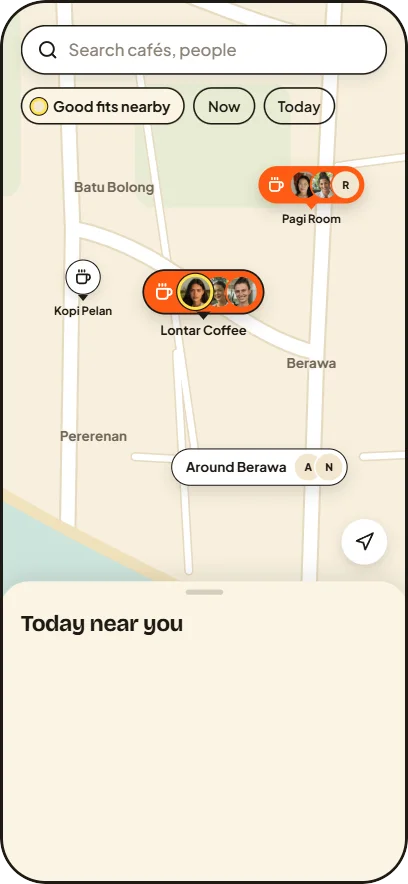
Find a café that works
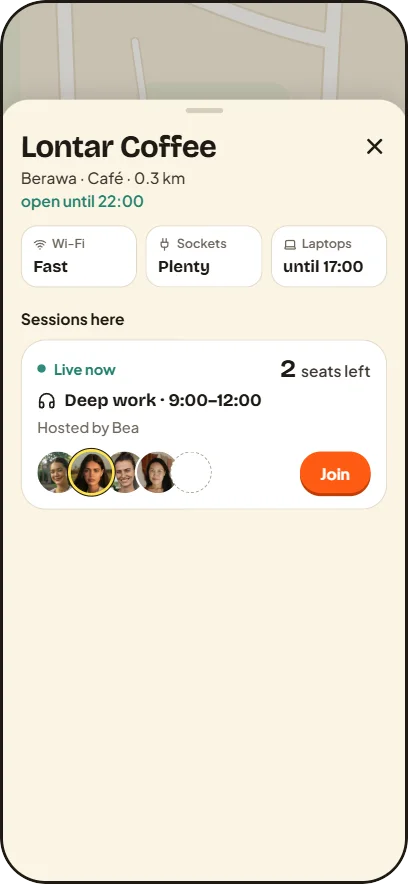
The map shows Canggu’s cafés and who’s working there now.
Also here
- Each café’s hours, and how far it is from you.
- Wi-Fi and sockets, from members who worked there.
- The faces of who’s working there now. Someone who hides from “Who’s here” shows as a blank circle, never named.
- Work here: start working at a café, alone or open to others.
- The check that you’re at the café happens on your phone, within about 300 metres.
- Around an area today: Batu Bolong, Canggu, Berawa or Pererenan, and what you’re up for (coffee, co-work or collab).
Chapter 4
Host or join a session
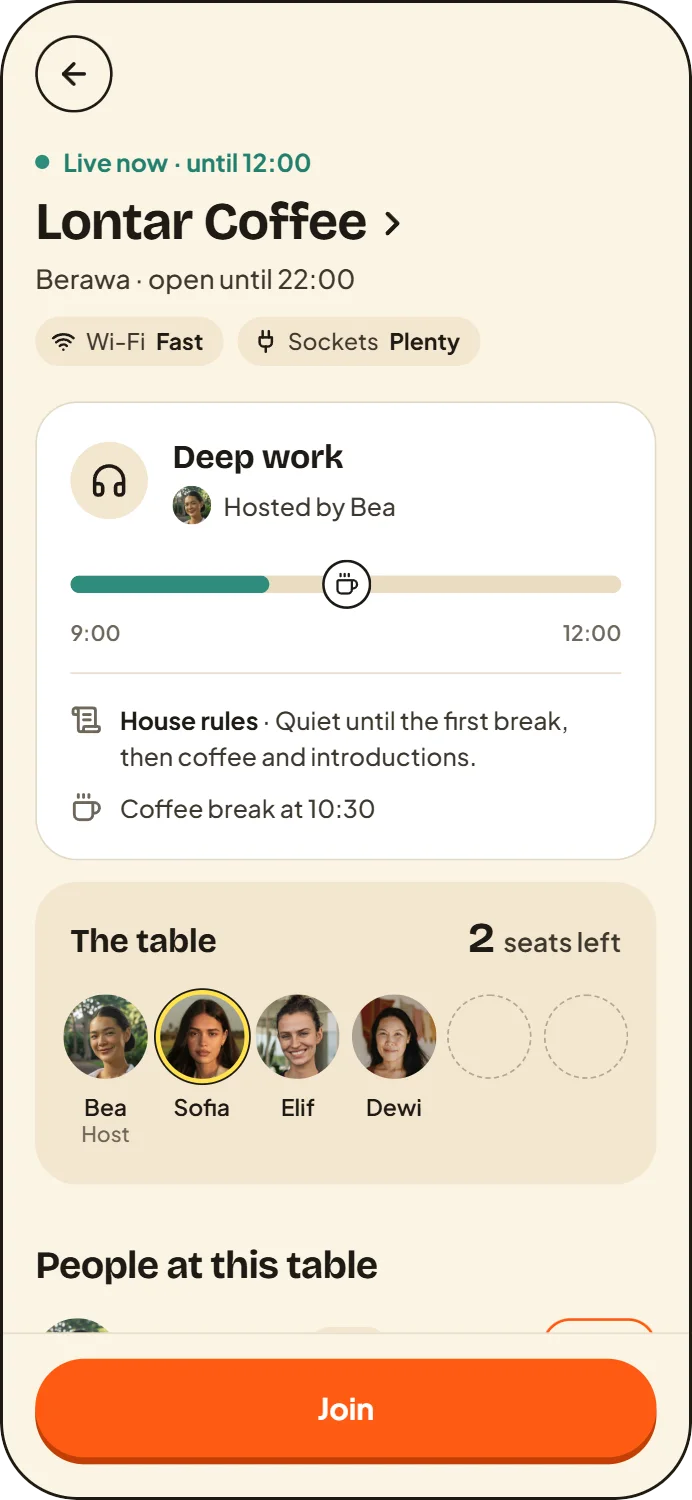
A session is a table at a café, with a time, a few seats and simple rules.
- 8:40Running late? Say so.
- 8:55I’m here.
- 9:00Quiet time.
- 10:30Coffee break.
- 12:00Check out.
Also here
- Host a session: Deep work, Content day, Design jam, Build in public or Calls OK.
- Choose the time, the seats and one house rule. Add a quiet time and a break from the session’s page.
- Join with one tap.
- Full? Join the waitlist. When a seat opens, it’s held for you for 15 minutes.
- A reminder 15 minutes before the start.
- Running late or Can’t make it: the host is told, nothing more.
- Tap I’m here when you arrive, and check out when you leave.
- Two quick questions afterwards: How was the Wi-Fi? Sockets?
Chapter 5
Say hi and keep in touch
Liked working next to someone? Say hi.
Also here
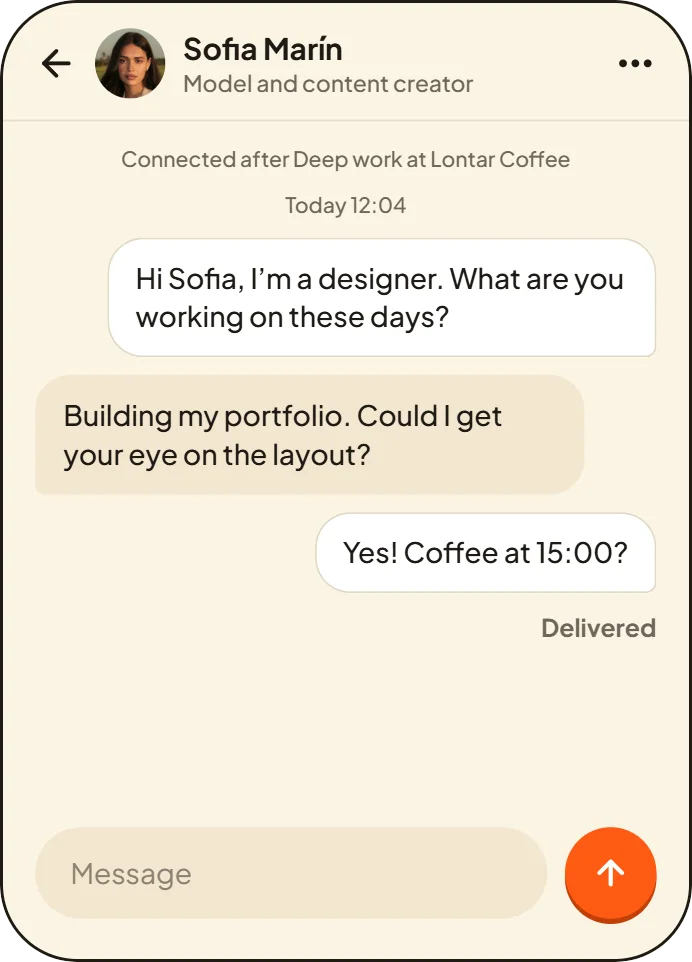
- Say hi with a short note, and suggest a café with “Coffee here?”
- Accept, or Not now. The sender is never told.
- An Inbox and a chat with each of your connections.
- “Sent” and “Delivered” under your latest message. “Read” only if you both turn it on.
- No typing indicator, no online status.
- Notifications, if you want them: new requests, messages, someone joining your session, a session starting soon, a seat opening up. They never show what people write.
- Me: your month (time worked, sessions, cafés and people met), your weekly streak and your sessions.
Chapter 6
You’re in control
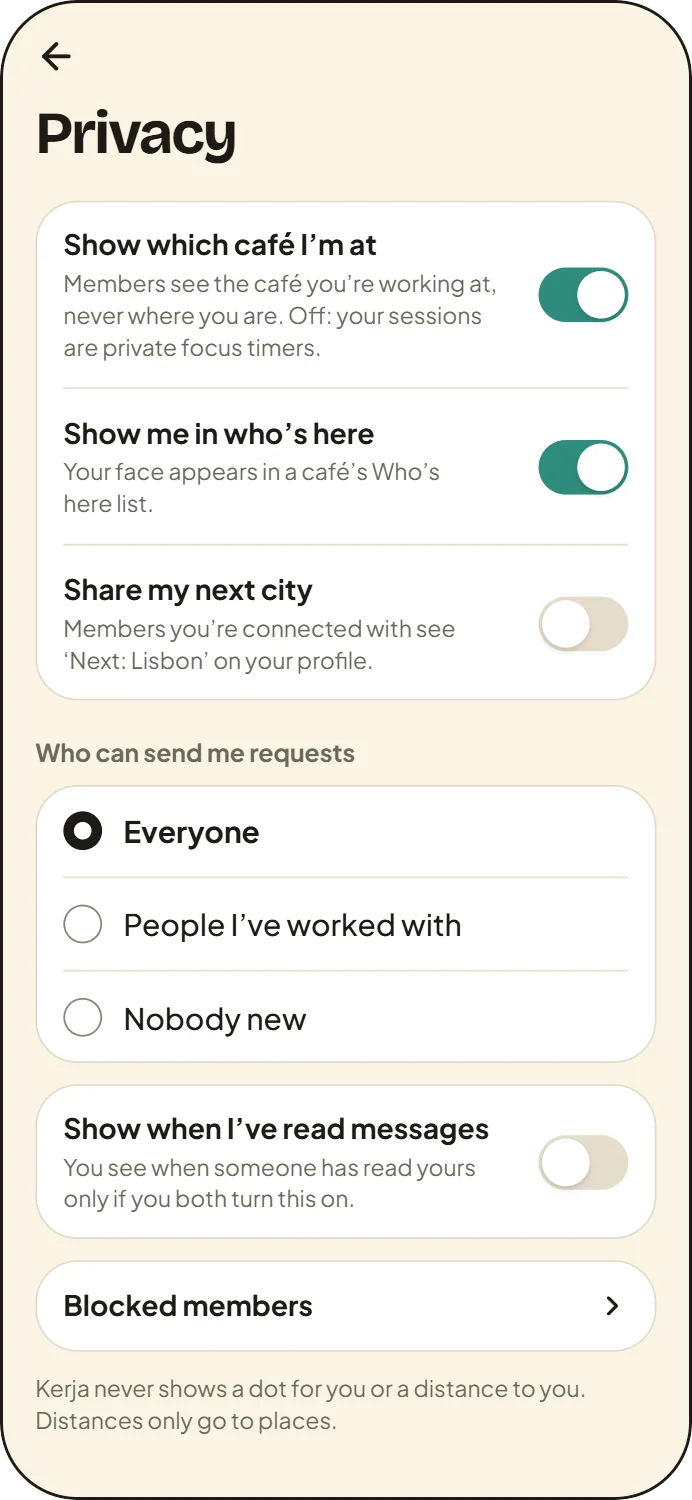
You decide who sees you, and who can reach you.
Also here
- Hide which café you’re at.
- Hide from “Who’s here”: you’re counted, never named.
- Choose who can send you requests: everyone, people you’ve worked with, or nobody new.
- Share your next city, or don’t.
- Read receipts on or off.
- Report and Block on every profile and in chat.
- Delete your account any time, in the app.
Every feature in the beta
Show what you’re building
- Sign in with Apple, Google or your email.
- One photo, your name and a headline.
- What you do, and what you’re looking for: clients, a co-founder, focus buddies, content…
- What you’re building, and what you need right now.
- Up to 3 things you can help with.
- Your answers to two questions, like “A project I’m proud of…”
- Open to: coffee, co-working, collabs.
- Your portfolio and Instagram.
- How long you’re in Canggu, and your next city (shown only to your connections).
Meet the right people today
- For you: 3 people a day, each with a reason, worked out on your phone.
- Nearby: who’s working at cafés, in sessions and around each area right now.
- Content creators: photographers, videographers, models and editors.
- Search by name, role or skill.
- On a profile: what you have in common, and how many times you’ve worked together.
- A suggested first line, a question about their work, that you can change.
Find a café that works
- Each café’s hours, and how far it is from you.
- Wi-Fi and sockets, from members who worked there.
- The faces of who’s working there now. Someone who hides from “Who’s here” shows as a blank circle, never named.
- Work here: start working at a café, alone or open to others.
- The check that you’re at the café happens on your phone, within about 300 metres.
- Around an area today: Batu Bolong, Canggu, Berawa or Pererenan, and what you’re up for (coffee, co-work or collab).
Host or join a session
- Host a session: Deep work, Content day, Design jam, Build in public or Calls OK.
- Choose the time, the seats and one house rule. Add a quiet time and a break from the session’s page.
- Join with one tap.
- Full? Join the waitlist. When a seat opens, it’s held for you for 15 minutes.
- A reminder 15 minutes before the start.
- Running late or Can’t make it: the host is told, nothing more.
- Tap I’m here when you arrive, and check out when you leave.
- Two quick questions afterwards: How was the Wi-Fi? Sockets?
Say hi and keep in touch
- Say hi with a short note, and suggest a café with “Coffee here?”
- Accept, or Not now. The sender is never told.
- An Inbox and a chat with each of your connections.
- “Sent” and “Delivered” under your latest message. “Read” only if you both turn it on.
- No typing indicator, no online status.
- Notifications, if you want them: new requests, messages, someone joining your session, a session starting soon, a seat opening up. They never show what people write.
- Me: your month (time worked, sessions, cafés and people met), your weekly streak and your sessions.
You’re in control
- Hide which café you’re at.
- Hide from “Who’s here”: you’re counted, never named.
- Choose who can send you requests: everyone, people you’ve worked with, or nobody new.
- Share your next city, or don’t.
- Read receipts on or off.
- Report and Block on every profile and in chat.
- Delete your account any time, in the app.
- Coming soon
Invite a friend to your table with a link.
- Coming soon
Every Monday: the week’s sessions in Canggu.
- Coming soon
Asks: ask for help, and the right people answer.
- Coming soon
Verified work: LinkedIn and work email.
- Coming soon
Your network travels with you.